
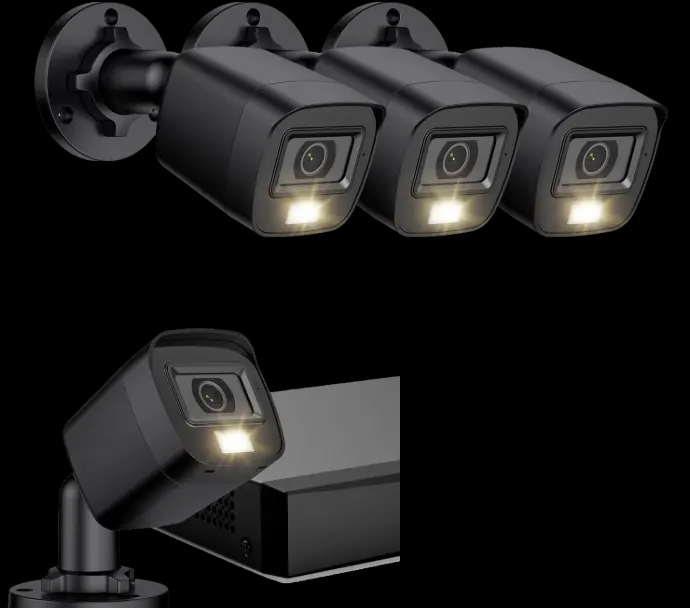
Power & data (PoE)
Power over Ethernet delivers power and video over a cable run to each camera. Fewer battery surprises; cleaner long-term power story for multi-camera sites.
Camera guide · Ohio
“Should I go wired or wireless?” is one of the most common camera questions we hear. The better question is what you need the video to do: continuous recording, app-integrated viewing with your alarm, or a mix. This guide compares professional wired PoE/NVR paths with wireless (and wired) Alarm.com camera options—without pretending one product line fits every house.
Start here
Preferred for many installs that want always-on recording: professional wired PoE cameras with an on-site NVR. We describe these publicly as professional wired PoE/NVR systems—without third-party kit branding on the website.
Also available: Alarm.com camera systems (wireless and wired/PoE where offered) when you want video that fits the same interactive platform as your HomeShield security plan. Do not assume every camera appears in every app—especially NVR cameras, which use a separate viewing path unless a specific configuration is verified.
Home Shield Alarm is based in Reynoldsburg, Ohio. We design camera layouts for real approaches—driveways, side yards, porches—not marketing diagrams. Explore security cameras, outdoor cameras, and 24/7 video recording for related service detail.
Comparison
Tradeoffs below are practical—not a claim that one technology is universally “better.”
Power over Ethernet delivers power and video over a cable run to each camera. Fewer battery surprises; cleaner long-term power story for multi-camera sites.
On-site NVR recording is built for continuous capture across the camera set. Retention and resolution are job-specific—we do not invent day-count or megapixel claims on this page.
Wireless cameras can reduce cable pulls on finished homes. They still need reliable power (or battery discipline) and a solid network path—wireless is not “zero infrastructure.”
Alarm.com cameras can live alongside arming and alerts in the Alarm.com experience when that is the chosen path. Preferred PoE/NVR kits typically use their own viewing tools—not the Alarm.com app by default.
PoE often means planning cable routes (attic, soffit, conduit). Wireless may mean fewer walls opened—but mounting, power, and Wi-Fi/network quality still matter outdoors.
Both paths can grow. We plan ports, cable plant, and app seats honestly so “add two cameras next year” does not force a rip-and-replace.
When each fits
Choose PoE/NVR when you want a dedicated recording appliance, multi-camera coverage, and a viewing path optimized for continuous video—especially outdoor-heavy designs. See also 24/7 video recording.
Choose Alarm.com cameras when keeping security events and video in one interactive workflow matters more than a separate NVR ecosystem—or when a smaller camera count fits the plan. Indoor and outdoor models are selected by model compatibility, not slogans.
Many Ohio homes mix tools: a monitored alarm system plus cameras on the approaches that matter, sometimes with a video doorbell at the front door. We explain which app opens which camera before you buy.
Long driveways and dark side yards often favor durable outdoor cameras with planned power—see outdoor security cameras.
Indoor coverage questions belong with layout and privacy expectations—browse indoor security cameras.
How you check video away from home depends on the path you choose—Alarm.com vs NVR tools. Related: remote camera viewing.
Myths to skip
We will not invent camera resolutions, analytics accuracy, or cloud retention days. Those depend on model and plan.
We will not say preferred wired NVR cameras automatically appear inside the Alarm.com app. If a configuration unifies viewing, we verify it for that job.
We will not brand preferred PoE kits with internal supplier names on public pages. You get professional wired cameras described plainly.
Related camera pages
Decision guide above; service pages below for deeper product context.
Camera overview for Ohio homes and businesses.
Coverage for approaches, yards, and entries.
Continuous recording design notes.
Interior placement and privacy considerations.
Front-door video for packages and visitors.
Ask for a camera layout that fits your home.
FAQ
PoE is a wired camera power/data method. Your alarm sensors may still be wireless on a 2GIG Edge system. Wired cameras and wireless sensors often coexist.
Many do, or they use a related network path. Weak outdoor Wi-Fi is a common failure mode—we design for signal reality, not brochure range.
Not by default. NVR systems typically use their own viewing path. We only claim unified viewing when verified for your configuration.
For many multi-camera, always-on recording jobs: wired PoE/NVR. For app-integrated security + video: Alarm.com cameras when they fit. Your property decides.
Camera-only projects happen, but many Ohio homes pair video with a monitored HomeShield system for response context—not video alone.
Free consultation
Tell us about outdoor approaches, indoor priorities, and whether you want continuous NVR recording or Alarm.com video. Based in Reynoldsburg—serving Ohio communities.
Quick quote request
PoE/NVR for dedicated continuous recording. Alarm.com cameras when app-integrated video fits. Local design—no brochure myths.